Customers

Customers and the LeftLane Customer app.Manage every buyer. Let them pay from their phone.

What is customer management in a DMS? It’s how a dealership keeps track of each buyer, from the deal to the last payment. In LeftLane your team keeps every buyer and co-buyer on one record. Your customers see their loan and pay you in the LeftLane Customer app or from a payment link.

One record

Every buyer, on one record.

Your team keeps each buyer and co-buyer on one record, from the deal to the loan account. Your customers get simple ways to pay you.

  1. 01Contact
  2. 02Identity
  3. 03Language
  4. 04Residences
  5. 05Employers
  6. 06Files
  7. 07Deals

How it works

For your team, then for your customers.

Part 1 is what your team uses. Part 2 is what your customers use.

Each step shows what happens and what LeftLane does for you.

Part 1 / For your team

Manage every buyer.

What your team uses to keep buyers and co-buyers on one record, from the deal to the loan account.

01 / Add the buyer

Add the buyer on the deal.

A buyer is ready to talk numbers. Start the deal with who is buying.

  1. 01

    Open the deal and add the buyer. Search by name, or create a new retail or business customer.

  2. 02

    Change the buyer any time before the deal books.

  3. 03

    Add a co-buyer from the deal. Co-buyers are people, not businesses.

  4. 04

    On the LeftLane Dealer app, scan a driver license to fill in the buyer.

  5. 05

    Pick a lead source for each deal from your dealership’s own list.

Automatic

What LeftLane does on its own at this step.

  • A business buyer makes the deal a wholesale cash deal.
  • Taxes and fees go to zero, and products, the lienholder and the co-buyer are removed.
02 / The record

Everything about a buyer, on one record.

Everything you know about a buyer lives on their customer page.

  1. 01

    Contact: name, email, a mobile number for automated texts, home, work and other phones, and addresses.

  2. 02

    Identity: date of birth, license type, ID number and state issued.

  3. 03

    Language: English or Spanish, used for the customer’s texts.

  4. 04

    Residence history: address, move in and move out dates, housing type and monthly payment.

  5. 05

    Employment history: employer, position, monthly income, status, dates and phone.

  6. 06

    Business customers: name, phone, address, email, dealer license number and resale tax number.

  7. 07

    Attachments: upload files to the customer.

  8. 08

    Deals: the customer’s page lists every deal they’re on, with its stage.

Check credit from the customer’s page: run a 700Credit prescreen or hard pull, or send a Plaid consumer report link. Credit and lending →

Automatic

What LeftLane does on its own at this step.

  • The Social Security number shows only its last four digits.
  • Phone numbers and Social Security numbers are checked when you save.
  • An email address can belong to only one person.
  • The customer’s time zone comes from their address.
  • Edit a name or number and deal and account searches pick it up right away.

03 / After booking

The buyer stays with the loan account.

The deal books and becomes a loan account. The buyer comes with it.

  1. 01

    The buyer and co-buyer stay on the loan account. Its Contact tab holds the borrower, the co-borrower, their files and their text history.

  2. 02

    Edit the customer, residences and employers right from the account.

  3. 03

    Text history shows each text sent, when, its type and whether it was delivered.

04 / Automated texts

Texts go out on their own, in English or Spanish.

When texting is set up, LeftLane texts customers who have an open account.

  1. 01

    Turn texting on or off for each account.

  2. 02

    Set each customer’s language to English or Spanish.

  3. 03

    Set the schedule for payment reminders.

The texts LeftLane sends

What LeftLane does on its own at this step.

  • Opt-in: the first text, sent when the deal books, with how to opt out.
  • Payment receipts.
  • Payment links, to the buyer or the co-buyer.
  • Payment reminders, on your dealership’s schedule.
  • Auto Pay reminders, the day before a draft.
  • Auto Pay failure notices.

05 / Find and import

Find, report and import.

Find any buyer fast, and bring the ones you already have.

  1. 01

    Search for a buyer by name when you add them to a deal.

  2. 02

    On the LeftLane Dealer app, one search covers vehicles, deals and accounts, by customer name or phone.

  3. 03

    Custom reports have a Customers view: deals, booked deals, most recent sale date, total booked sales, open accounts and total payoff.

  4. 04

    By default, Admin, Sales, Collections and Collections Manager roles can add and edit customers.

  5. 05

    Switching systems? LeftLane loads your customers and co-buyers from Frazer, Friday Systems, IDMS, WinCars, CPS and Silver Lands, or from LeftLane’s own import format.

Staff also have a Virtual Payment Terminal to run a card for any other payment. Payments →

Part 2 / For your customers

Let them pay from their phone.

What your customers use to see their loan and pay you: the LeftLane Customer app and payment links.

06 / Customer app

The LeftLane Customer app.

Your borrowers get their own app on iPhone, Android and the web.

  1. 01

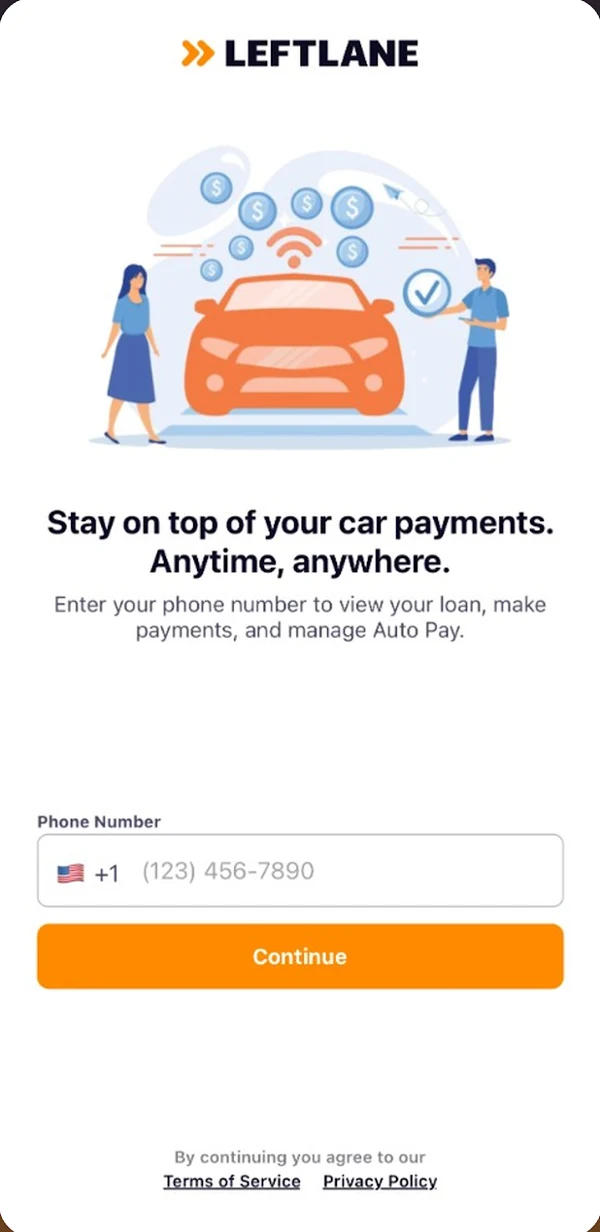
    Sign in with a code texted to their mobile number. No password.

  2. 02

    LeftLane matches the login to their customer record by mobile number.

  3. 03

    See every loan they have with you.

  4. 04

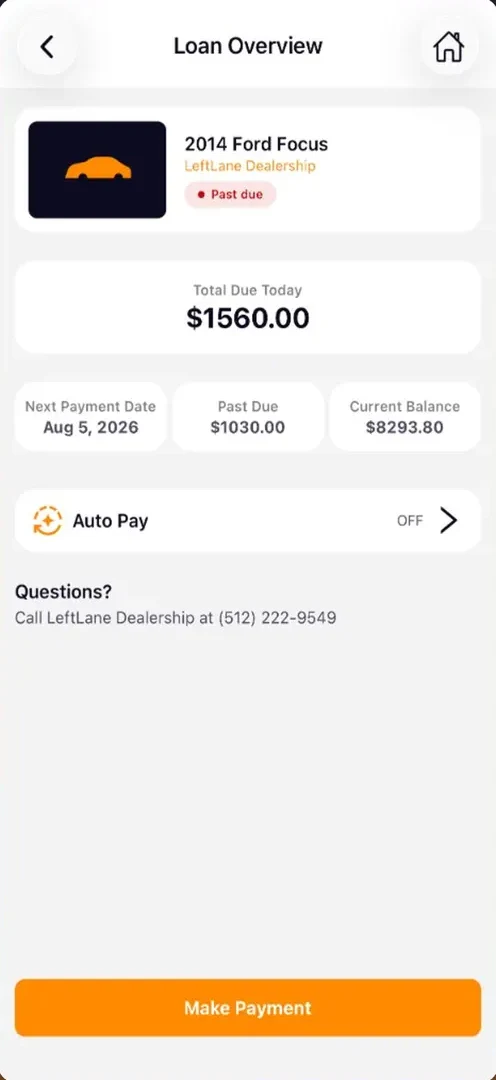
    For each loan: the vehicle, amount due today, past due, next payment, payoff and the payment schedule.

  5. 05

    Pay by card. The convenience fee shows before they pay, and your partial payment setting applies.

  6. 06

    Turn Auto Pay on or off with a saved card.

  7. 07

    Switch the app between English and Spanish.

  8. 08

    If a loan is paid off or charged off, the app says so. If you turn online payment off, the app tells them and offers a button to call your dealership.

  • LeftLane Customer app sign in: enter a phone number to view your loan, make payments and manage Auto Pay
    Sign in with a phone number
  • LeftLane Customer app loan overview: total due today, next payment date, past due, current balance, Auto Pay and Make Payment
    See what’s due, then pay

Apply on your LeftLane website

Dealer websites LeftLane builds and hosts include an online credit application.

Questions

What dealers ask.

Can customers pay by bank account?

Yes, on a payment link when your dealership allows it. The app takes cards.

How else can customers pay?

Send a payment link by text. It opens in a web browser for a quick payment.

Is it in Spanish?

Yes. Texts follow the customer’s language, and the app switches between English and Spanish.

What if a customer has two loans?

They see both in the app. Auto Pay is set for each loan separately.

Can a business buy a vehicle?

Yes. A business buyer makes the deal a wholesale cash deal.

Can the co-buyer get a payment link?

Yes. Text it to the co-buyer from the account.

Can I bring my existing customers?

Yes. LeftLane loads your customers and co-buyers along with your deals and accounts.

Get started

Put every buyer on one record.

Start a free trial, or book a demo and we’ll walk a buyer from the deal to their first payment with you.